AdvancedContext Engineering
// Disclaimer: Product name and branding have been changed for legal reasons.
Aboutthe project
Context
AI coding assistants had an adoption problem. Engineers tried them, got irrelevant suggestions, and reverted to working manually. The root cause wasn't model quality. It was context.
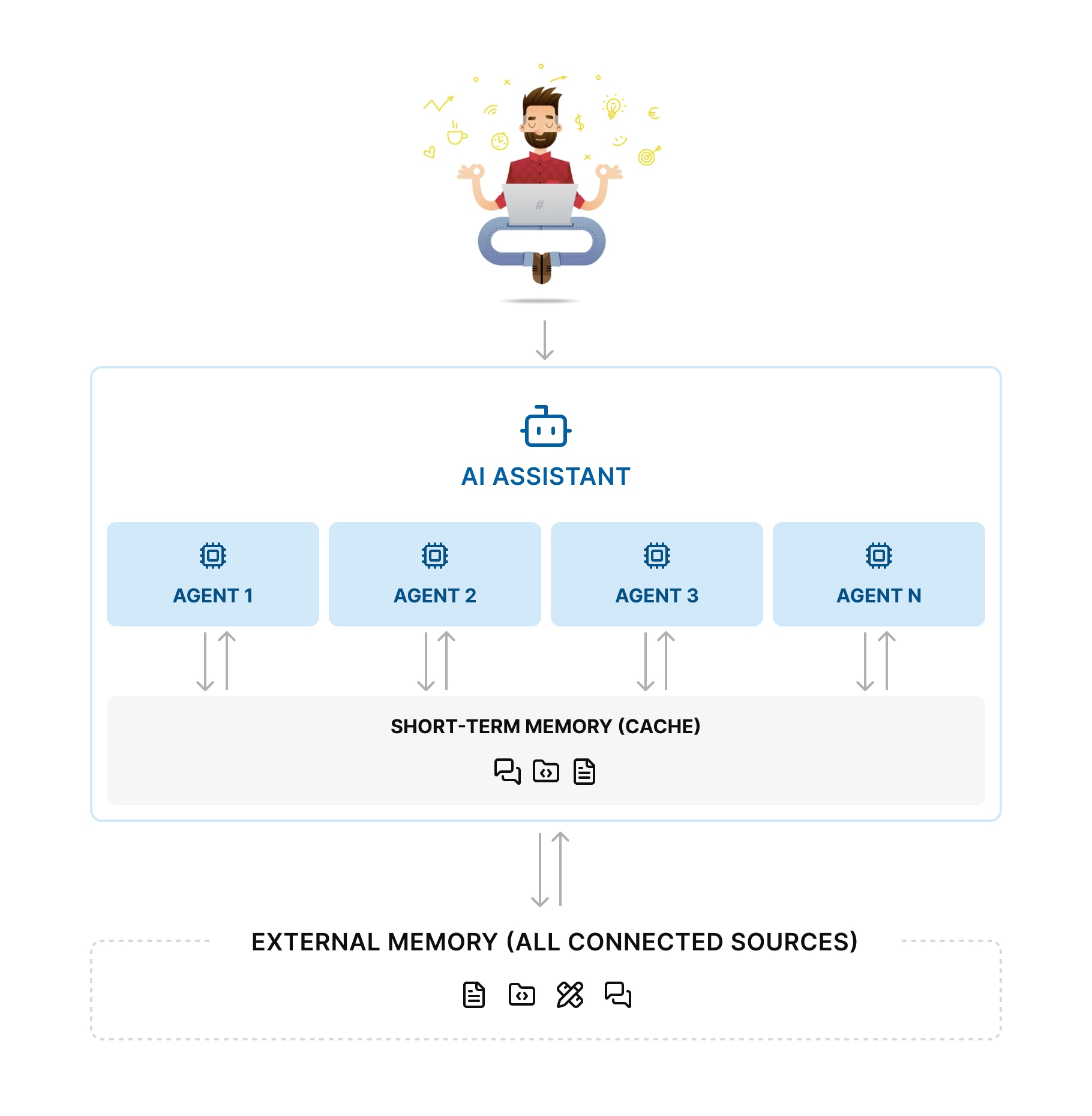
These tools operated blind, cut off from the codebases, tickets, docs, and decisions that shape real engineering work. Without project context, even capable models produce noise.
Challenge
Prove that giving engineers explicit control over AI context (what goes in, what stays out, and how it's structured) improves both output quality and developer trust.
My Design Footprint
End-to-end: identified the opportunity, framed the problem space, ran competitive research and user interviews, defined UX strategy, designed interactions, prototyped, and led structured user testing.
Signs ofSuccess
Outcome
- 56% higher suggestion accuracyFewer irrelevant outputs, less time correcting code. Engineers trusted the suggestions enough to use them.
- 2x faster task completionEngineers finished tasks in half the time. The assistant handled context gathering that used to be manual.
- Smoother collaboration80% of engineers said in-chat interactions made their workflow faster and more natural.
Designprocess
Research
I audited the AI coding tool landscape (Copilot, Cursor, and others) and interviewed developers and product managers who use them daily. I also drew on my own experience building with these tools. One pattern was consistent: every tool assumed the AI should figure out context on its own. None gave engineers real control.
Design principles
Three patterns kept surfacing across research and interviews:
Build Trust
Show the reasoning. Make every action and decision transparent.
Right Level of Control
Let engineers choose between full automation and co-pilot mode. Never decide for them.
Context Is King
Only relevant, clean, well-structured context. Anything else is noise.
Pain points
Research uncovered dozens of friction points. I prioritized three, the ones that appeared in every interview and blocked adoption the hardest:
- Wrong context. Missing, excessive, or irrelevant. This produced suggestions engineers couldn't trust.
- Pulling relevant context into the IDE (docs, tickets, chats, architecture decisions) was manual and fragmented.
- Engineers spent more time explaining context to the AI than writing code.
Proposed solution
The core design decision: make context selection explicit and collaborative, not silent and automatic.
I explored the full spectrum — from fully automated context retrieval to manual file picking. Full automation broke trust: engineers couldn't see what the AI was using. Manual selection was accurate but too slow. The answer was in between: AI-suggested context with human review.
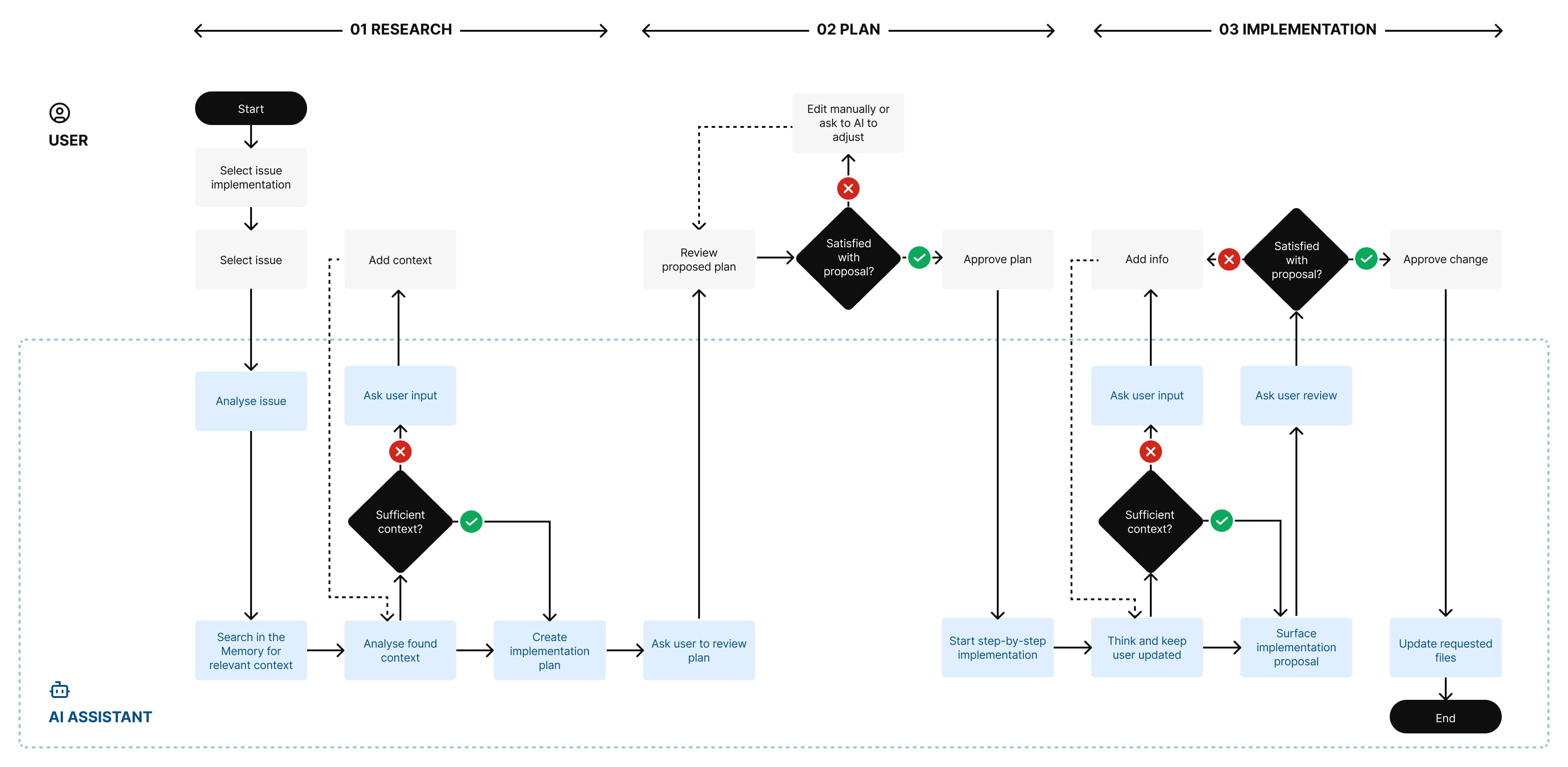
This shaped a three-phase workflow:
- ResearchThe assistant searches connected sources and surfaces relevant context.
- PlanIt analyzes the context and proposes an implementation plan.
- ImplementationIt executes each step.
Engineers stay in control throughout adding context, leaving comments, adjusting direction. Key interactions happen directly in chat to keep the flow tight.
User flow
Visual and InteractionDesign
Integration with project management systems
This directly tackles pain point #2. Project knowledge lived in tools engineers used daily but couldn't reach from the IDE.
Engineers connect their project management platform (Jira, Monday, Asana, Linear) and pull issues straight into the assistant's context. For speed, this is also available from the Quick Start menu.
Context management
The Right Level of Control principle in action.
The assistant scans connected sources for relevant context, but doesn't use it blindly.
With Context Control enabled, engineers review what the AI suggests before it proceeds. They can remove items, add missing context, or leave comments. All without leaving the chat.
Implementation plan
Phase two of the workflow. The assistant breaks the task into steps and proposes an implementation plan.
Engineers review, edit, reorder, or add steps before the AI executes. No black-box automation. No awkward in-chat explanations. Every step is visible and adjustable.